Googleサーチコンソールを利用していると「Remove all Google+ web integrations from ドメイン名」のメールが登録メールアドレスに届きます。
こちらですが、簡単に言えば3月7日にGoogle+の連携機能を停止するため、サイト運営者はGoogle+に関係するものすべてを削除してくれというものです。
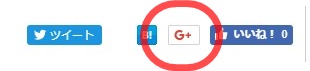
例えば、以下のGoogle+ボタンなどのことです。
英語全文
こちらの内容は英語で以下のように書かれています。
Remove all Google+ web integrations from あなたのドメイン名
To owner of あなたのドメイン名
Google has announced that Google+ for consumers will be sunset. As part of the sunset, all Google+ web integrations will stop serving on March 7, 2019. This has the potential to affect website layouts and/or functionality if no action is taken by website owners.
Developers are strongly advised to remove related code from their websites as soon as possible.
Recommended action:
Remove all integration with Google+Find and remove all references to Google+ integrations. Some examples include buttons (such as +1 buttons, Follow buttons, Hangouts buttons, and share buttons), badges, and interactive posts.
簡単に言えば、Google+の連携サービスはすべて2019年3月7日に停止するから、ウェブサイトからGoogle+関連コードは早急に取り除いてもらいたいということです。
解決策
一般的なサイト運営者の場合にはGoogle+のボタンを削除するだけで問題ないはずです。
Google+ボタンの削除方法はテンプレートによって異なりますし、テンプレートによってはそもそもGoogle+ボタンを表示させてないこともあります。
ここではテンプレート賢威を用いて、削除方法を掲載しておきます。
Google+ボタンの削除
上のようなGoogle+ボタンが表示されている場合、今後は意味をなさなくなるので削除するべきです。
賢威7の場合
賢威7は以下のように表示されています。
テーマ編集⇒social-button.php
<aside class="sns-list">
<ul>
<li class="sb-tweet">
<a href="https://twitter.com/share" data-text="<?php the_title(); ?> | <?php bloginfo('name'); ?>" data-url="<?php the_permalink(); ?>" class="twitter-share-button" data-lang="ja"><?php _e('Tweet', 'keni'); ?></a>
</li>
<li class="sb-hatebu">
<a href="http://b.hatena.ne.jp/entry/<?php the_permalink(); ?>" data-hatena-bookmark-title="<?php the_title(); ?> | <?php bloginfo('name'); ?>" class="hatena-bookmark-button" data-hatena-bookmark-layout="simple-balloon" title="<?php _e('Add this entry to Hatena Bookmark.', 'keni'); ?>"><img src="https://b.st-hatena.com/images/entry-button/button-only@2x.png" alt="<?php _e('Add this entry to Hatena Bookmark.', 'keni'); ?>" width="20" height="20" style="border: none;" /></a>
</li>
<li class="sb-fb-like">
<div class="fb-like" data-width="110" data-href="<?php the_permalink(); ?>" data-layout="button_count" data-action="like" data-show-faces="false" data-share="false"></div>
</li>
<li class="sb-gplus">
<div class="g-plusone" data-href="<?php the_permalink(); ?>" data-size="medium"></div></li>
</ul>
</aside>
から
<li class="sb-gplus">
<div class="g-plusone" data-href="<?php the_permalink(); ?>" data-size="medium"></div></li>
を削除します。
テーマ編集⇒social-button2.php
<aside class="sns-list"> <ul> <li class="sb-tweet"> <a href="https://twitter.com/share" class="twitter-share-button" data-lang="ja"><?php _e('Tweet', 'keni'); ?></a> </li> <li class="sb-hatebu"> <a href="http://b.hatena.ne.jp/entry/" class="hatena-bookmark-button" data-hatena-bookmark-layout="simple-balloon" title="<?php _e('Add this entry to Hatena Bookmark.', 'keni'); ?>"><img src="https://b.st-hatena.com/images/entry-button/button-only@2x.png" alt="<?php _e('Add this entry to Hatena Bookmark.', 'keni'); ?>" width="20" height="20" style="border: none;" /></a> </li> <li class="sb-fb-like"> <div class="fb-like" data-width="110" data-layout="button_count" data-action="like" data-show-faces="false" data-share="false"></div> </li> <li class="sb-gplus"><div class="g-plusone" data-size="medium"></div></li> </ul> </aside>
から
<li class="sb-gplus">
<div class="g-plusone" data-size="medium"></div></li>
を削除します。
以上で以下のようになります。

賢威8の場合
賢威8は以下のように表示されています。

テーマ編集⇒template-parts⇒part-sns.php
<aside class="sns-btn_wrap">
    <div class="sns-btn_tw" data-url="<?php the_permalink(); ?>" data-title="<?php the_title(); ?>"></div>
    <div class="sns-btn_fb" data-url="<?php the_permalink(); ?>" data-title="<?php the_title(); ?>"></div>
    <div class="sns-btn_hatena" data-url="<?php the_permalink(); ?>" data-title="<?php the_title(); ?>"></div>
    <div class="sns-btn_gplus" data-url="<?php the_permalink(); ?>" data-title="<?php the_title(); ?>"></div>
</aside>
からGoogle+ボタンを意味する以下を削除します。
<div class="sns-btn_gplus" data-url="<?php the_permalink(); ?>" data-title="<?php the_title(); ?>"></div>以上で以下のようになります。